Site Mailbox Support
OnePlaceMail extends SharePoint Site Mailboxes to help overcome many of their
limitations. Site Mailboxes are only available to Outlook 2013 (or
later) clients when saving to SharePoint/Exchange 2013 (or later)
environments. The SharePoint 2013 Site must be extended with the Site
Mailbox App.
The following short videos demonstrate how Site Mailboxes are being extended
with OnePlaceMail:
- How do I capture email attributes when saving to SharePoint Site Mailboxes
- How do I save to SharePoint Site Mailboxes from Windows File Explorer and
Office
- How do I tag content with custom metadata when saving to SharePoint Site
Mailboxes
- How do I manage email attachments with Site Mailboxes
- How do I access SharePoint from with Outlook Site Mailboxes
Site Mailboxes - 5 short Videos
|
Capture Email attributes
Capture Email attributes when saving to Site Mailboxes. |
Tag Content when saving
Tag Content with custom metadata when saving to Site Mailboxes. |
Extend Site Mailboxes
Save to Site Mailboxes from Windows Explorer and Office
applications. |
 |
 |
 |
|
Access SharePoint
Access SharePoint capabilities from Site Mailboxes. |
Manage Attachments
Manage Email Attachments with Site Mailboxes. |
|
 |
 |
|
Settings
The Settings window allows you to configure how OnePlaceMail interacts with SharePoint Site
Mailboxes.
Enable Site Mailbox support
This setting will enable OnePlaceMail support for extending Site Mailboxes in
the Outlook client. The Outlook client must be restarted for the setting to
effect.
Show Site Mailbox compatibility warnings
OnePlaceMail supports extending Site Mailboxes when Outlook is running in
cached mode. In the event an Outlook client is not running
cached mode, OnePlaceMail can pro-actively present a compatibility
warning.
This warning can be disabled from appearing.
How do I exclude OnePlaceMail for selected site Mailboxes?
OnePlaceMail provides the flexibility to exclude specific Site Mailboxes from
being extended by OnePlaceMail during the process of saving content to a Site
Mailbox.
OnePlaceMail allows you to deploy a configuration setting to specify the Site Mailboxes to include or
exclude from being extended by OnePlaceMail. Please refer to the
following knowledge base article for further details:
Clear Site Mailbox configuration Cache
To help improve performance when interacting with SharePoint Site Mailboxes,
OnePlaceMail caches some details regarding the SharePoint Site Mailbox
locations.
There are scenarios when an existing Site Mailbox may be moved or
renamed within SharePoint. Under this type of scenario, the Site Mailbox
cache can be cleared. Therefore, allowing OnePlaceMail to reestablish the
correct details for the Site Mailbox location/name.
Saving to Site Mailboxes – Controlling the process
Use native Site Mailbox process
To not extend site mailboxes for the capture of email attributes or tagging
with custom metadata you can exclude
a Site Mailbox from being managed by OnePlaceMail. Note: All libraries
within the Site Mailbox will adhere to the configuration setting.
Use OnePlaceMail
When saving content to a SharePoint / Site Mailbox location, OnePlaceMail can
optionally present the ‘Save to SharePoint’ window allowing the user to tag
content with custom metadata.
OnePlaceMail provides the ability to
define a default global setting for this behavior. The setting can also be
overridden on a location by location basic when defining your favorite
OnePlaceMail locations - See section ‘1.1.1: Manage My OnePlaceMail Folders
(Favorites) in Outlook’ earlier in this user guide.
Site Mailboxes reference
the global setting to determine if the ‘Save to SharePoint’ window will appear.
Saving to Site Mailboxes
Tag content with Custom Metadata
The screenshot below shows the ability to tag content with custom metadata
(Columns) when saving to SharePoint 2013 Site Mailboxes. Email attributes
are also captured automatically when saving email attachments or emails.
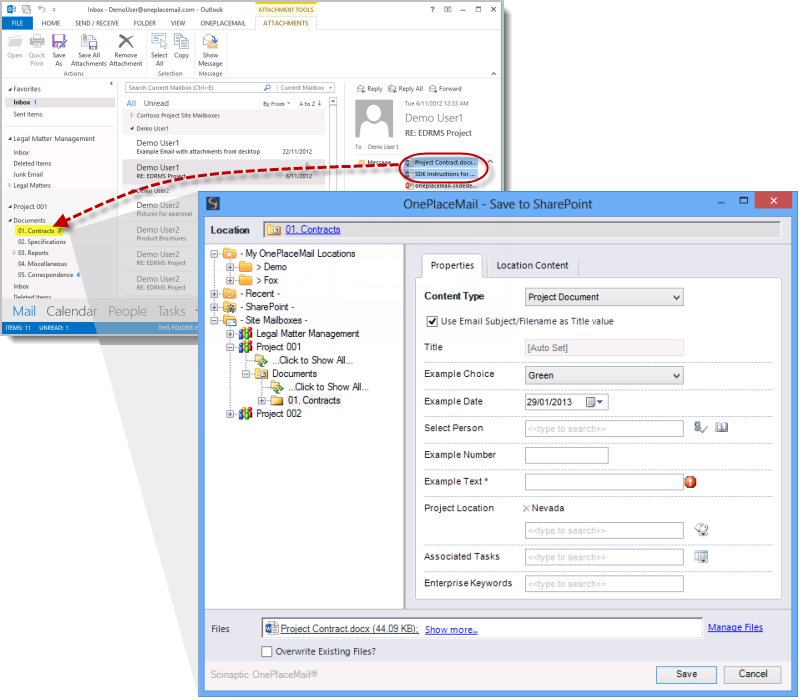
Tag content with custom metadata when saving to a Site Mailbox