Connect to your OnePlace Solutions Site
The OnePlace Solutions admin client allows you to configure settings and create OnePlaceLive Profiles.
OnePlaceLive delivers personalized business systems providing a consistent way to capture, classify, access, action and create content regardless of your system design.
Pre-requisite
Add the OnePlace Solutions Administration site
Install the OnePlace Solutions client
- Install the client application on any IT/SharePoint administrators desktop.
- Download OnePlaceLive Admin Client
OnePlace Solutions Desktop Software: The OnePlaceLive version should match the OnePlaceMail & OnePlaceDocs installed in your environment
Connect to the administration site
- Launch OnePlaceLive
 from the desktop
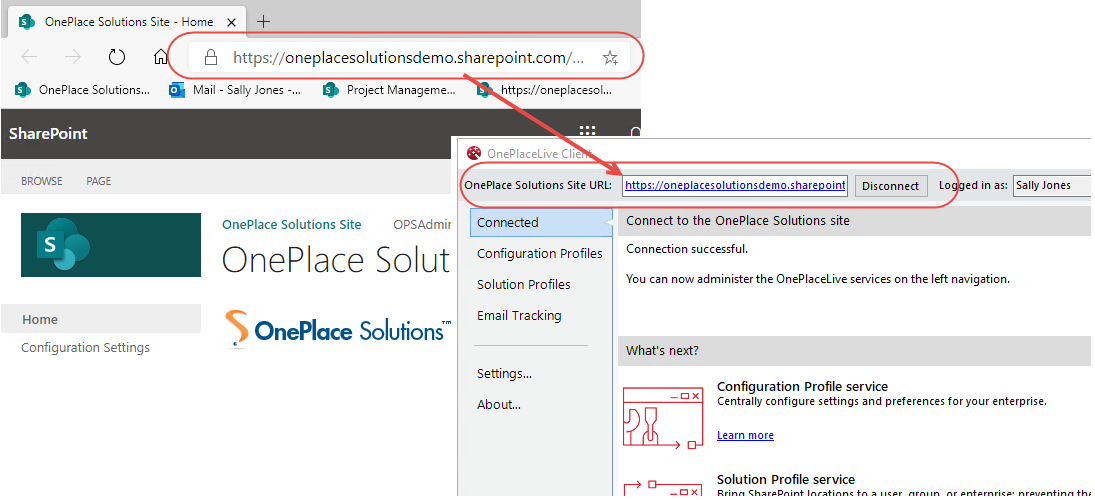
 - Browse to the OnePlace Solutions Admin site. Copy url > Paste the Url
>> Create and deploy OnePlaceLive Profiles
