General
The General area contains settings used throughout the OnePlace Solutions product suite. Modifying these settings will apply to both OnePlaceMail and OnePlaceDocs.
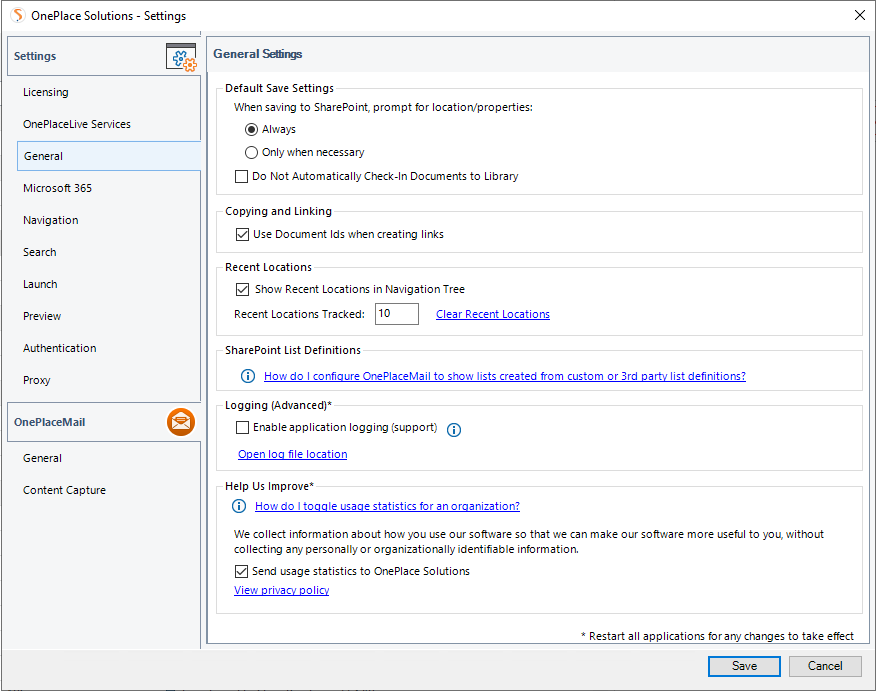
Default Save Settings
The default save setting applies to all SharePoint / Office 365 locations accessed by search or browsing the security trimmed SharePoint navigation tree hierarchy. These also apply to favorite and recent locations.
When saving, prompt for properties: Always
If selected, the Save to SharePoint window will appear when saving content to this location. The save to SharePoint window provides the opportunity to capture additional metadata and/or select other filing locations.
When saving, prompt for properties: Only when necessary
If selected, the Save to SharePoint window will not appear. If a required column is available on the library the dialog box will appear to capture metadata.
The user can override the default behavior on a location by location basis when adding favorite locations. OnePlaceLive Solution Profiles allow you to define specific save settings which cannot be modified by the end user.
Do Not Automatically Check-in Document to this Library
Selecting this item, will prevent items being automatically checked-in to a document / picture library. All uploaded items to a library will be saved in a ‘Checked-out’ status.
Copying and Linking
The 'Use Document Id's when creating links' determines the URL structure when inserting links to items in SharePoint / Office 365. If the Document ID feature is enabled in your SharePoint / Office 365 environment, the Document ID will be used in the URL structure. If it has not been enabled in SharePoint, this setting is ignored.
Recent Locations
Recent locations automatically maintain a list of locations accessed via OnePlaceMail or or OnePlaceDocs. The number of recent locations that are tracked can be modified and if required, the list of recent locations can be cleared.

SharePoint List Definition
SharePoint provides various list and library definitions. Additional list definitions may also be created to extend your SharePoint environment.
The most common list and library types are displayed, your OnePlace Solutions Administrator can enable additional definitions to display in the navigation tree. This can be configured via OnePlace Live, Configuration Profiles.
Logging (Advanced)
A OnePlace Solutions support representation may request you enable logging if assisting with any technical issue. This will write verbose details to a log file and help with troubleshooting.
Help us Improve
Anonymous telemetry may be captured to assist customer support and continuous improvements of products and services. Telemetry is optional and can be disabled individually or across an enterprise deployment. Untick this dialog box to disable telemetry. This can be disabled at the time of deployment. Learn more here.
